> For the complete documentation index, see [llms.txt](https://docs.frase.io/llms.txt). Markdown versions of documentation pages are available by appending `.md` to page URLs; this page is available as [Markdown](https://docs.frase.io/feature-reference/content-scores-explained.md).
# Content Scores Explained
See how Frase evaluates and helps optimize your content for traditional search and AI discovery, with clear steps to improve your SEO, GEO, and EEAT scores.
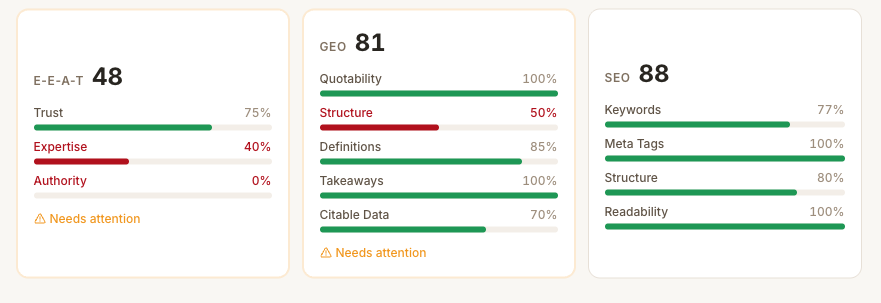
Your Content Scores are broken down into EEAT, GEO, and SEO. Each score:
* Runs on a **0–100 scale**
* Updates as you edit and improve with AI
* Uses clear visual signals:
* **Red:** Needs work
* **Yellow:** Good
* **Green:** Strong
* Comes with **specific, actionable suggestions**
### EEAT Score
The **EEAT Score** determines how well your content stands up to Google's quality and ranking guidelines. It focuses on whether your copy builds trust, shows expertise, and exerts authority.
#### How to improve it
* Complete your ***Author Bio*** to show expertise
* Add high authority citations and author info
* Expand content depth
* Add author social profiles and credentials
{% hint style="success" %}
**Tip:** Use Frase's built-in Author Profiles to enhance EEAT scores with ease. Manage yours under **Settings > Profile.**
{% endhint %}
### GEO Score (Generative Engine Optimization)
The GEO Score measures how easily AI systems—like ChatGPT, Claude, Perplexity, and Google’s AI Overviews—can extract, understand, and reference your content.
#### What it evaluates
* **Direct answer potential:** Can AI pull clear, concise answers?
* **Citation worthiness:** Is the information authoritative and quotable?
* **Structured information:** Are facts, stats, and definitions easy to parse?
* **Question coverage:** Does the content answer real AI-style prompts?
{% hint style="success" %}
If SEO helps people *find* you, GEO helps AI *choose* you.
{% endhint %}
#### How to improve it
* Add clear definitions and explanations
* Include concrete stats and data points
* Answer questions explicitly (don’t imply or be vague)
* Use structured formats like lists, tables, & FAQs
* Cite authoritative, trustworthy sources
{% hint style="info" %}
To find out why your GEO score is low, ask the Frase Agent in the **Ask AI** tab, or Claude with [Frase MCP](https://claude.ai/customize/connectors/directory/frase) connected. To see whether AI actually cites the page, track it in [AI Visibility](/core-workflows/ai-visibility-and-geo.md).
{% endhint %}
### SEO Score
The SEO Score measures how well your content aligns with on-page traditional search best practices.
#### How to improve it
* Refine keyword placement (especially in headings)
* Clean up heading hierarchy
* Expand thin sections
* Strengthen internal and external linking
A score in the **70–85+ range** is generally solid.
{% hint style="success" %}
SEO isn’t about stuffing keywords. It’s about *coverage*. If competitors consistently mention something you don’t, Google notices.
{% endhint %}
{% hint style="info" %}
Keywords only count toward your SEO score when they appear as a **whole word**. A target term tucked inside a longer word won’t earn credit, so make sure the keywords you’re tracking show up as standalone words in your copy.
{% endhint %}
### How to Use Content Scores
{% stepper %}
{% step %}
#### View your scores
Scores appear in the top-right corner of the Editor in any article.
{% endstep %}
{% step %}
#### Drill into suggestions
Click any score to see exactly what’s helping or hurting it.
{% endstep %}
{% step %}
#### Optimize intentionally
Use Frase’s optimization suggestions to:
* Apply improvements with one click
* Or make manual revisions (some improvements need your input and cannot be automated)
{% endstep %}
{% step %}
#### Prioritize realistically
* Don’t chase perfect 100s
* Focus on beating competitor averages
* Improve the score that lags the most first
{% endstep %}
{% endstepper %}
---
# Agent Instructions
This documentation is published with GitBook. GitBook is the documentation platform designed so that both humans and AI agents can read, navigate, and reason over technical content effectively. Learn more at gitbook.com.
## Querying This Documentation
If you need additional information that is not directly available in this page, you can query the documentation by asking a question.
Perform an HTTP GET request on the following URL with the `ask` and `goal` query parameters:
```
GET https://docs.frase.io/feature-reference/content-scores-explained.md?ask=&goal=
```
`ask` is the immediate question: it should be specific, self-contained, and written in natural language.
`goal` is what the user is ultimately trying to achieve, the reason they need the answer. Sharing it helps GitBook give you a better, more relevant answer. A goal is most helpful when it describes the outcome the user wants rather than restating the question. For example, with `ask=how do I create an API token`, a goal like `automate deployments from our CI pipeline` lets GitBook tailor the answer to that use case.
The response will contain a direct answer to the question and relevant excerpts and sources from the documentation.
Use this mechanism when the answer is not explicitly present in the current page, you need clarification or additional context, or you want to retrieve related documentation sections.